
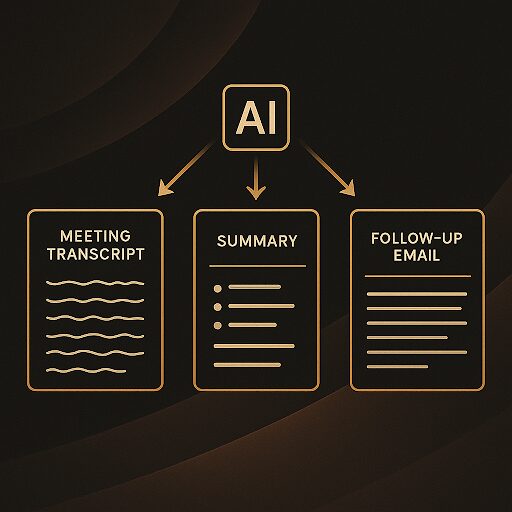
In the fast-paced world of accounting, client meetings are the lifeblood of our relationships and the engine of our service delivery. Yet, how often do we leave a productive discussion only to face the daunting task of transcribing notes, identifying action items, and drafting follow-up communications? This manual process is not just a time sink; it’s a potential bottleneck for client satisfaction, staff productivity, and ultimately, firm growth. Imagine a world where the tedious work of capturing meeting details and outlining next steps is largely automated, freeing up your team to focus on strategic insights and client engagement.
This isn’t a futuristic fantasy; it’s a present-day reality thanks to the power of artificial intelligence. By leveraging specific, well-crafted prompts with AI tools, accounting firms can dramatically streamline their post-meeting workflows. We’re not talking about replacing human judgment or the nuanced art of client interaction, but rather empowering your team with an intelligent assistant that handles the administrative heavy lifting. In this article, we’ll explore three transformative AI prompts designed to automate your client meeting notes and next steps, helping you save hours, improve accuracy, and elevate your client service to new heights. Get ready to embrace a smarter, more efficient way to manage your most valuable client interactions.
The Hidden Drain of Manual Meeting Management
Let’s be honest: taking comprehensive, accurate meeting notes while actively participating in a client discussion is a superpower few possess. Most of us juggle between listening, contributing, and scribbling down key points, often missing nuances or important details. The aftermath is equally challenging. Reconstructing a coherent summary from scattered handwritten notes or a hastily typed document takes valuable time – time that could be spent analyzing financial data, strategizing for a client, or developing your team. This isn’t just about personal inconvenience; it’s a systemic drain on firm resources.
Consider the cumulative effect across your firm. If each partner, manager, or senior accountant spends an extra 30-60 minutes per client meeting on administrative tasks like note-taking, summarizing, and drafting follow-ups, these hours quickly add up. For a firm with dozens or hundreds of client meetings each month, this translates into hundreds of lost productivity hours annually. Beyond the time cost, there’s the risk of inaccuracy. Misremembered details, overlooked action items, or delayed follow-ups can erode client trust and lead to missed opportunities. A client might feel unheard if a key point isn’t reflected in the follow-up, or frustrated if an agreed-upon action item isn’t addressed promptly. Furthermore, the mental load of remembering every detail contributes to burnout, impacting the well-being of your dedicated staff. The traditional approach to meeting management is not just inefficient; it’s an outdated model that can hinder your firm’s ability to scale, innovate, and maintain a competitive edge. It’s time to acknowledge this hidden drain and proactively seek modern solutions that align with the forward-thinking nature of our profession.
Your AI Assistant: How Intelligent Tools Transform Transcripts into Action
The core idea behind automating meeting notes with AI hinges on one simple principle: transforming raw audio or text into structured, actionable information. Most modern meeting platforms (Zoom, Microsoft Teams, Google Meet) offer built-in transcription services, converting spoken words into text. Even if your platform doesn’t, dedicated transcription tools are readily available and increasingly accurate. This transcript is your goldmine – the raw material that an AI assistant can process and refine. Think of the AI as a highly intelligent, tireless intern whose sole job is to sift through every word spoken, identify the critical elements, and present them in a format you specify.
Once you have a transcript, you feed it into a large language model (LLM) like ChatGPT, Claude, Gemini, or a similar AI assistant. These models are trained on vast amounts of text data, enabling them to understand context, identify patterns, and generate human-like text. When you provide a specific prompt, the AI uses its understanding to extract, summarize, and reorganize the information from your transcript according to your instructions. It’s crucial to remember that while these tools are powerful, they are most effective when given clear, precise directives. For accounting firms, data privacy and security are paramount. Always ensure you are using AI tools that comply with your firm’s data security policies and relevant regulations. Many enterprise-grade AI solutions offer enhanced privacy features, or you can opt for secure, self-hosted environments. The goal is to leverage technology to enhance human capabilities, not replace them, by turning a verbose transcript into a clear, concise, and actionable meeting record, ready for review and application.
Prompt 1: The Comprehensive Meeting Summary Generator
The first step in streamlining your post-meeting workflow is obtaining a clear, concise summary of the discussion. Instead of sifting through pages of transcript, let AI do the heavy lifting. This prompt is designed to extract the core essence of your meeting, making it easy for anyone to quickly grasp what was discussed and decided.
The Prompt
“Analyze the following meeting transcript. Provide a concise summary of the key discussion points, major decisions made, and any topics explicitly deferred for future discussion. Structure the summary with clear, distinct headings for each section (e.g., ‘Key Discussion Points,’ ‘Decisions Made,’ ‘Deferred Topics’). Ensure the summary is no more than 300 words and uses professional, business-appropriate language.
**[Insert Meeting Transcript Here]**”
Why This Prompt Works
*Clarity and Conciseness:** By explicitly asking for “concise” and limiting the word count, you force the AI to distill information to its most critical elements. This prevents verbose or overly detailed outputs that defeat the purpose of a summary.
Structured Output: The request for “clear, distinct headings” ensures the information is organized logically, making it easy to scan and comprehend. This structure is invaluable for quick internal reviews or for sharing with team members who couldn’t attend.
Targeted Information Extraction: Specifying “key discussion points,” “major decisions made,” and “topics explicitly deferred” directs the AI to focus on the most impactful aspects of the conversation, filtering out casual chatter or irrelevant tangents.
Professional Tone: Requiring “professional, business-appropriate language” ensures the output is suitable for internal firm records and potential client communication without needing significant edits.
Benefits for Your Firm and Time Savings: Drastically reduces the time spent manually summarizing meetings, freeing up partners and staff for higher-value tasks.
Consistency: Ensures a consistent format and level of detail for all meeting summaries, improving internal record-keeping.
Improved Recall: Provides a quick reference point for past discussions, minimizing misunderstandings and forgotten details.
Enhanced Onboarding: New team members can quickly get up to speed on client history by reviewing structured meeting summaries.
To further enhance the output, consider adding context to your prompt. For example: “This was a quarterly review meeting with [Client Name], focusing on [specific project/topic].” Providing this context helps the AI better understand the meeting’s purpose and prioritize information accordingly. You might also specify if certain keywords or phrases should be highlighted or if you want the summary to focus on specific client goals. Always review the AI-generated summary against the original transcript to ensure accuracy and make any human-led adjustments. While AI is powerful, your expert judgment remains irreplaceable in delivering nuanced client service.
Prompt 2: Actionable Next Steps & Owner Assignment
A meeting without clear action items is like a ship without a rudder – it drifts. One of the most critical outcomes of any client discussion is a definitive list of “who does what by when.” Manually sifting through a transcript to identify every commitment, assign an owner, and suggest a realistic deadline is a painstaking process prone to error. This prompt transforms that chore into an automated, precise task.
The Prompt:
“From the provided meeting transcript, meticulously identify all explicitly stated or strongly implied action items. For each action item, clearly assign an owner (based on who committed to the task or who it logically falls to within the discussion) and suggest a tentative deadline if one was mentioned or can be reasonably inferred from the context. Format this as a bulleted list, with each item following this structure:
Action Item: [Concise description of the task]
Owner: [Name of person responsible]
Suggested Deadline: [Date or timeframe, e.g., ‘End of next week,’ ‘Before year-end,’ ‘By July 15th’]
If an owner or deadline is not explicitly mentioned but can be reasonably inferred, state that it is ‘Inferred.’ If neither is clear, indicate ‘To Be Determined (TBD).’
[Insert Meeting Transcript Here]
Why This Prompt Works:
Granular Extraction: The prompt specifically asks for “explicitly stated or strongly implied action items,” encouraging the AI to look beyond direct commands and capture commitments made through discussion.
Structured Accountability: The defined format (Action Item, Owner, Deadline) is designed for immediate usability, making it easy to integrate into project management tools or internal task lists. It forces the AI to identify these three critical components for every task.
Handling Ambiguity: The instruction to indicate “Inferred” or “TBD” for owner/deadline provides a crucial safeguard. It acknowledges that not everything will be perfectly clear in a transcript and prompts the AI to flag areas needing human clarification, rather than making potentially incorrect assumptions.
Practical Application: This output is directly usable for creating task lists, updating project plans, or sending internal team reminders.
Benefits for Your Firm:
Prevents Dropped Balls: Ensures no critical action item is overlooked, maintaining momentum and preventing delays.
Boosts Accountability: Clearly assigns responsibility, making it transparent who is tasked with what, reducing confusion.
Streamlines Project Management: Provides a ready-made list of tasks that can be directly imported or copied into your firm’s project management software.
Enhances Client Trust: Clients see that their requests and discussions are being acted upon promptly and efficiently, reinforcing your firm’s professionalism.
Real-World Scenario:
Imagine a client meeting where “Sarah mentioned she’d look into the Q3 payroll tax discrepancy,” and “David said he’d send over the updated financial projections by Friday.” A human might miss one of these or forget the deadline. With this prompt, the AI would likely output:
Action Item: Investigate Q3 payroll tax discrepancy.
Owner: Sarah
Suggested Deadline: TBD (Inferred: ASAP)
Action Item: Send updated financial projections.
Owner: David
Suggested Deadline: This Friday (Inferred)
This level of detail, automatically generated, significantly reduces the administrative burden and ensures nothing falls through the cracks. It empowers your team to move from discussion to execution with unparalleled efficiency.
Prompt 3: Client Communication Draft & Follow-Up Email
Following up promptly and professionally after a client meeting isn’t just good practice; it’s a cornerstone of exceptional client service. However, drafting these emails can be surprisingly time-consuming, especially when trying to accurately recap discussions, confirm next steps, and maintain a consistent tone. This third prompt leverages AI to generate a polished draft of your client follow-up email, saving precious time and ensuring clarity.
The Prompt:
“Based on the meeting summary and action items (provided separately or from the same transcript), draft a professional and concise follow-up email to [Client Name].
The email should:
1. Express appreciation for their time.
2. Briefly recap the key discussion points and major decisions made (referencing the summary).
3. Clearly list the confirmed next steps, including who is responsible and any agreed-upon deadlines (referencing the action items).
4. Offer to answer any questions or provide further clarification.
5. Maintain a helpful, proactive, and professional tone consistent with an accounting firm’s client communication.
Subject Line: [Suggest a clear, concise subject line, e.g., ‘Summary of Our Meeting – [Date] – [Client Name]’]
[Insert Meeting Summary and Action Items Here, or refer to the full transcript if you want AI to generate them in one go]
Why This Prompt Works:
Comprehensive Structure: The prompt outlines all essential components of a professional follow-up email, ensuring no critical element is missed. This acts as a quality control checklist for the AI.
Integration of Prior Outputs: By explicitly referencing the “meeting summary” and “action items,” it encourages the AI to pull directly from